


Issue Description
Some customers reported that Huawei S6730 switch was continuously generating a large number of BPDU-related logs. The logs appeared frequently and raised concerns about potential service impacts. The customer requested immediate assistance to identify the root cause.
Network Environment
- S6730-H-V2 Distribution Switch, such as S6730-H28X6CZ-V2
- Version: V600R022C00SPC500 + V600R022SPH121
- S12700E-4 Core Switch
- Version: V200R022C00SPC500 + V200R022SPH223
Troubleshooting Process
1. Check STP Logs on the S6730 Switch
The first step was to analyze the logs on the S6730 switch. It was found that STP topology changes occurred at the same time the alarms were generated.
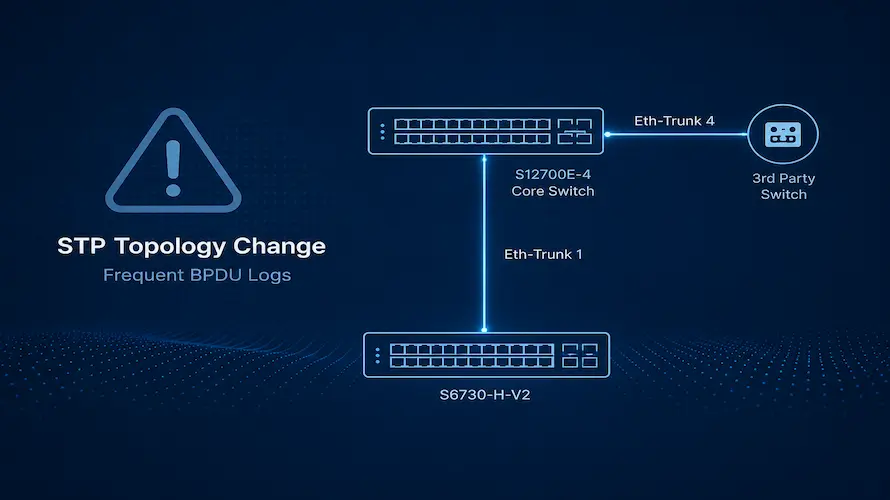
Further investigation showed that the switch received STP Topology Change (TC) packets through Eth-Trunk 1, which triggered STP recalculation.
2. Verify the Connected Device
Using LLDP information, it was confirmed that Eth-Trunk 1 on the S6730 was connected to the S12700 core switch.
This indicated that the TC packets were being forwarded through the core layer.
3. Check STP Information on the Core Switch
The STP status on the S12700 was then examined.
Similar topology change records were found on the core switch. The logs showed that the S12700 had received STP TC packets from Eth-Trunk 4.
4. Trace the Source of the TC Packets
LLDP information on the S12700 revealed that Eth-Trunk 4 was connected to a third-party switch.
This confirmed that the STP Topology Change packets originated from the third-party device and were propagated through the network.
Root Cause
The third-party switch continuously sent STP Topology Change (TC) packets into the network.
After receiving these TC packets, the S6730 and S12700 switches triggered frequent STP topology recalculations.
During each topology change event, the switches flushed MAC address and ARP entries and then relearned them again. As a result:
- Frequent MAC address relearning occurred.
- ARP entries were repeatedly refreshed.
- Network convergence events increased significantly.
- Service traffic could be affected in some scenarios.
Solution
The recommended solution is to investigate the third-party switch and determine why it is continuously generating STP Topology Change packets.
After identifying the source of the topology changes, the issue should be corrected on the third-party device to eliminate the root cause.
Workaround
If the issue cannot be fixed immediately on the third-party switch, the following temporary workarounds can be considered.
Option 1: Disable STP on the Connected Interface
Disable the STP function on the core switch interface connected to the third-party switch.
This prevents the core switch from processing STP TC packets received from the third-party network.
Note: After STP is disabled on the interface, Huawei devices will no longer participate in loop prevention on that link. If a Layer 2 loop occurs within the third-party network, the Huawei network will not be able to block it, which introduces a potential loop risk.
Option 2: Configure STP TC Restriction
Configure the following command on the core switch interface connected to the third-party switch:
stp tc-restriction enableThis feature prevents the switch from triggering STP topology recalculation when receiving STP TC packets, reducing the impact of excessive topology change notifications.
Conclusion
In this case, the large number of BPDU-related logs on the S6730 switch were caused by continuous STP Topology Change packets originating from a third-party switch. These packets triggered frequent STP recalculations, resulting in repeated MAC and ARP table updates.
The best approach is to identify and resolve the abnormal STP behavior on the third-party switch. If an immediate fix is not possible, temporary measures such as disabling STP on the affected interface or enabling STP TC restriction can help mitigate the impact.